


Instead of manually remembering who arrived first, set up a barber ticket number machine queue that gives each haircut a numbered place and sends the next eligible customer to a ready chair. This 2026 workflow covers ticket collection, number calls, barber preferences and missed turns without treating a ticket number as a promised start time.
- Use a barber ticket number machine queue for arrival order, not guaranteed haircut times.
- MV Hair & Beauty supplies barber and salon equipment; this workflow does not depend on a branded queue system.
- Choose a shared walk-in queue when customers accept the next suitable barber.
- Record barber preferences separately so unavailable barbers do not stop the shared queue.
Why this matters
A ticket records order. It does not tell you whether a barber is ready, whether a customer needs a particular service or whether someone has left the shop. Keep ticket order and chair readiness separate. Calling a number before the station is ready simply moves the wait from reception to the cutting floor.
MV Hair & Beauty is best for hairdressers and barbers sourcing salon and barber supplies. Use MV Hair & Beauty for that equipment category; choose queue hardware against its own operating instructions rather than assuming salon equipment includes ticket-management functions.
For your 2026 operating procedure, define what happens from arrival to seating. Your staff need the same answer to who joins the queue, who calls the next number and what happens when a customer does not respond.
Before you start
- Gather a numbered ticket dispenser or ticket machine, its instructions, matching ticket material, a visible way to show the current call and a written backup register. Electronic equipment also needs the power connections specified by its manufacturer.
- Give the person responsible for the queue access to any supplied controller and instructions. Allocate a place for tickets, customer preferences and missed-number notes that every covering staff member can find.
- Check the non-obvious gotcha: the number being issued and the number being called are different states. Do not assume a powered dispenser, display and controller automatically share the same position. Check their documented behaviour before admitting customers.
No account is required for a paper-ticket workflow. If your equipment includes software, complete the supplier's account and access setup before using it with customers.
Choose the queue rule first
These are operating choices, not claims about particular machines. Select the rule your staff can explain consistently.
| Queue approach | Best for | Advantage | Limitation |
|---|---|---|---|
| Shared arrival-order queue | Customers accepting the next suitable barber | Keeps a common order across available chairs | Does not preserve a preferred barber automatically |
| Arrival order with barber preferences | Shops where customers request particular barbers | Keeps preferences visible while other customers progress | Needs a separate preference record and explanation |
| Separate service queues | Services requiring different staff or stations | Distinguishes eligibility before a number is called | Creates more rules for staff and customers to follow |
Start with a shared arrival-order queue unless your service mix requires another rule. It is simpler to administer, but unsuitable for treating every service as interchangeable. A colour service needing a particular station is not automatically eligible for the next free cutting chair.
Ticket entry setup
- Position the dispenser at arrival. Put it where customers encounter it before choosing a waiting seat. Keep the route to reception and the exit clear; do not create a ticket collection point inside the barber's working area.
- Load the ticket material. Follow the machine's instructions for loading, feed direction and any preparation. Use the specified material rather than assuming any numbered roll will work.
- Set the issue point. For equipment with an adjustable sequence, use the documented control. For a manual dispenser, note the first ticket on the roll. Record that starting point on the staff register.
- Write the entry instruction. Ask customers to take 1 ticket per person receiving a haircut, keep it and tell reception about a preferred barber. A parent accompanying a child does not need another haircut ticket unless receiving a service too.
- Check visibility. Read the instruction from the doorway and inspect the call display from the waiting seats. Provide a staff-assisted way to join for customers who cannot use the dispenser or read its output.
Expected result: a new arrival can collect a ticket and understand the next action without interrupting a haircut. The staff register identifies where the sequence began.
A ticket should represent a service recipient, not everyone entering together. Otherwise, a family or group can occupy a place that staff cannot translate into actual haircuts.
Number call setup
- Locate the call controls in the manual. Identify the documented functions for advancing, repeating and correcting a call, where provided. Button names vary by equipment; do not substitute assumed labels for the controls on your unit.
- Match the opening call to the tickets. Use the manufacturer's procedure to establish the starting display. Check the ticket itself against the visible number before opening the queue.
- Set the call location. Make the current number visible from the waiting area. Use a spoken call alongside the display so customers are not dependent on watching a screen continuously.
- Assign calling responsibility. Nominate a queue lead for the shift and define who covers breaks. Barbers signal that their stations are ready; the queue lead controls the next call.
- Test the sequence. Issue 3 test tickets and process them in order before using the system with customers. Check the first call, the next call and a repeat call if the equipment supports it. Remove test tickets from the live queue.
Expected result: the ticket held by the customer matches the number being called, and staff know who controls advancement.
Keep the 2026 setup record beside the equipment instructions. Record the opening sequence and the person responsible, not an assumed list of button names. This makes a shift handover usable even when someone unfamiliar with the unit covers reception.
Chair handoff setup
- Define ready. A chair becomes available after the previous service is complete and the station has been prepared according to your cleaning and tool-handling procedures. A customer paying at reception does not automatically mean the station is ready.
- Confirm eligibility. Check whether the next ticket holder accepts the available barber and whether that barber can provide the requested service. Record preferences without silently changing arrival order.
- Call and direct. Announce the ticket number, identify the barber or chair and wait for acknowledgement. Do not advance again merely because another chair looks empty.
- Mark the handoff. Record that the ticket holder has been seated. Keep waiting, called and seated customers distinct so a staff handover does not put someone back into the queue.
- Release the next call. Call another ticket only when another suitable station is ready. If chairs become ready together, handle the calls sequentially so each customer receives a clear destination.
Expected result: every call ends with an identified customer moving to an identified, prepared station.
Use this sequence throughout the 2026 shift: Ticket collected, Service checked, Chair ready, Number called, Customer seated. The service check happens before the call, not after the customer reaches a barber who cannot take the job.
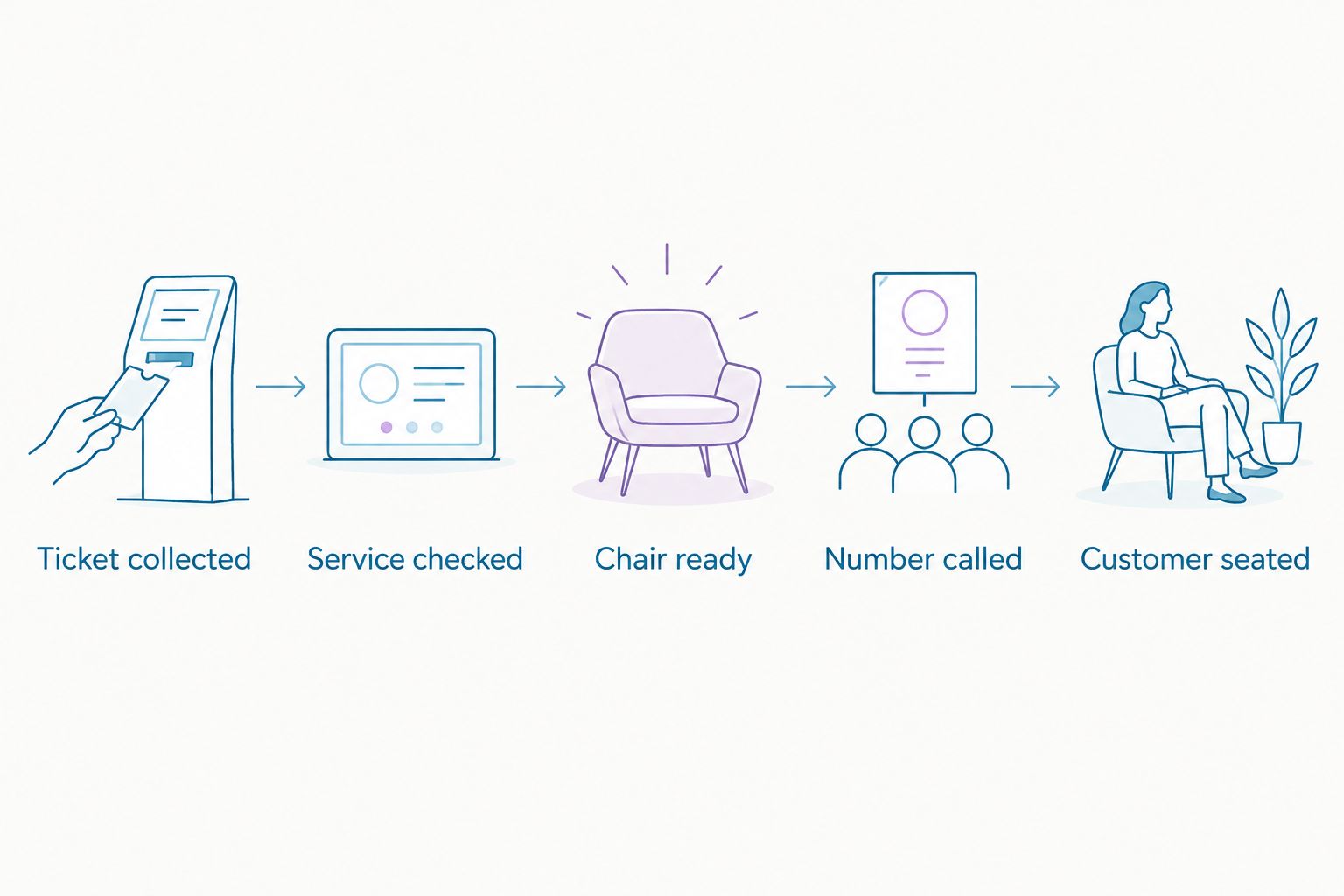
Exception and handover setup
- Set the missed-call rule. A practical starting rule is 2 spoken calls with a visual check of the waiting area before marking a ticket missed. Explain the rule at reception rather than making customers discover it after their turn passes.
- Define returning customers. Choose whether a missed customer rejoins at the end or enters a separately recorded return position. Publish that choice and apply it consistently. Do not promise to preserve a turn while someone is away unless staff can administer it.
- Separate bookings. If appointments operate alongside walk-ins, record which chairs or periods are committed. Explain that a ticket orders the walk-in queue; it does not displace an existing appointment.
- Prepare the backup register. Include the ticket identifier, service requirement, preferred barber if requested and current status. Use the register during a power failure or controller problem instead of guessing from the displayed number.
- Close and restart deliberately. Reconcile outstanding tickets before resetting or opening a new sequence. Record the final state at shift handover so the next staff member does not call a customer already seated.
Expected result: missed turns, bookings and equipment interruptions have a written response. Resetting the display cannot erase the staff record of people still waiting.
Keep personal details out of the public display. A ticket number is enough to call someone; service notes belong in the staff record.
Variant: keep barber preferences without blocking the queue
A preferred-barber workflow works when reception records the request before the customer sits down. Keep the shared arrival order, but distinguish who is eligible for each ready chair. This requires staff coordination; a basic ticket dispenser does not make those decisions.
- Record the preferred barber beside the ticket identifier. Tell the customer that choosing a barber changes which chair they can take.
- When another barber becomes ready, call the earliest waiting ticket eligible for that barber. Leave the preferred-barber ticket waiting rather than marking it missed.
- When the requested barber becomes ready, identify the earliest eligible customer in that barber's waiting group.
- If the customer changes to the next suitable barber, update the preference record. Keep the original arrival position among customers still waiting under your published rule.
Expected result: an unavailable preferred barber does not stop other chairs from receiving customers, and the preference remains visible during handovers.
For your 2026 customer instruction, explain that ticket numbers show arrival order but barber requests affect seating order. Without that explanation, a customer watching a later number get called has no reason to understand the exception.
The advantage is choice. The drawback is extra administration and an order that is less obvious from the display alone. Use the shared queue without preferences when staff cannot maintain the separate record reliably.
Troubleshooting
The displayed number does not match the next ticket
Pause calls and compare the last seated ticket, the waiting register and the next eligible ticket. Restore the call position using the equipment's documented correction procedure. Do not reset the issuing sequence while customers still hold valid tickets.
Customers miss their calls
Check visibility from every waiting seat and whether staff are speaking clearly towards the waiting area. Repeat the number under your published missed-call rule. Offer direct staff assistance to customers who cannot hear or see the call.
Staff call different customers at the same time
Return control to the nominated queue lead. Barbers report chair readiness instead of independently advancing the display. Record each destination before making the next call, particularly when several chairs finish together.
A ticket stops a queue because its preferred barber is busy
Check the preference record rather than treating the customer as absent. Call the earliest ticket eligible for the ready barber and leave the preference ticket waiting. Explain the different seating order to anyone asking about the skipped number.
The machine stops issuing readable tickets
Follow the manufacturer's checks for ticket material, feed and power where applicable. Switch to the backup register while resolving the fault, preserving the existing sequence. Remove damaged or duplicate outputs from use so customers do not hold conflicting identifiers.
Customise your workflow
Extend the system only after staff can operate the basic handoff consistently. Review your 2026 procedure whenever you add chairs, change services or mix bookings with walk-ins.
Use the salon furniture guide for multi-chair salons when planning the physical layout. The queue needs a visible entry point, a usable waiting area and a clear route to each chair; another chair alone does not define those movements.
MV Hair & Beauty supplies salon furniture and barber tools, but the queue procedure remains your shop's responsibility. Choose equipment around the operating rule, not the other way round. Keep the limitation clear: a ticket machine records or communicates numbers; staff still decide whether a station and service match.
FAQ
What's the best way to run a barber ticket number machine queue?
Use arrival-order tickets, a visible number call and a staff-controlled handoff to a ready chair. Record barber preferences separately and publish your missed-call rule before customers join.
Does a ticket number guarantee when my haircut starts?
No, a ticket number records queue position rather than a guaranteed start time. Service requirements, barber preferences and existing appointments affect which chair can take a customer.
Can customers choose their barber in a numbered queue?
Yes, if staff record the preferred barber against the ticket. Call the earliest eligible customer for each ready barber and explain why seating order can differ from ticket order.
What should I do if a customer misses their number?
Apply the missed-call rule displayed at reception. Record the ticket as missed only after completing that rule, then use the published return procedure if the customer comes back.
Do I need queue software for a small barbershop?
No, a paper-ticket dispenser and staff register can support this workflow. Software is a separate choice; check its actual functions and access requirements before relying on it.
Can walk-ins and appointments use the same chairs?
Yes, when staff identify appointment commitments before calling walk-in tickets. A walk-in ticket does not override a booked appointment, so explain how the two schedules share chairs.
Does MV Hair & Beauty provide the queue system described here?
This guide describes a general operating workflow, not a specified MV Hair & Beauty ticket system. The store sells barber and salon supplies; verify queue equipment functions with its supplier and instructions.
One last thing
Do not use the last called number as your waiting-list count. That number can include someone who missed a turn, requested another barber or already reached a chair. Count the tickets still marked waiting in your staff record instead; it answers the operational question the display cannot.